

A team skill matrix is a grid that scores each person against the skills their role actually needs, usually on a 0–4 or 1–5 scale, so gaps and bottlenecks become visible instead of guessed at. Its value is simple: it turns "I think Sarah knows SQL" into a number you can act on. The fastest way to see this for yourself is to open a spreadsheet right now and list 6 to 10 skills that matter most for one team.
TL;DR:
- Most teams only have reliable skill data for a small, critical subset of skills, which emphasizes the need for clear minimum proficiency levels.
- Building and updating a skill matrix should take less than 90 minutes, focusing on key skills, manager ratings, and calibration for accuracy.
- Validating ratings through scenario-based assessments and cross-referencing self, manager, and peer feedback ensures trusted data and highlights real capability gaps.
- Regularly calibrating and updating the matrix, especially after role changes or certifications, maintains its usefulness for staffing, training, and succession planning.
- Cross-training and targeted hiring become more effective once gaps are clearly identified and prioritized with decision-ready, continuously maintained matrices.
Table of Contents
- What Is a Team Skill Matrix?
- Why Build a Skills Matrix? The Real Payoff
- What a Modern Skills Matrix Should Capture
- How to Build a Team Skill Matrix in Under 90 Minutes
- How to Validate Ratings So They're Trustworthy
- A Ready-to-Copy Template Structure
- Common Mistakes That Kill a Skills Matrix
- Turning Gaps Into Hiring, Training, and Cross-Training Plans
- Why Calibration Conversations Matter More Than the Spreadsheet
- Validate What the Matrix Finds With Real Practice Reps
- Sources
- FAQ
What Is a Team Skill Matrix?
A skill matrix puts people (or roles) in the rows and skills in the columns, with each cell holding a proficiency rating. That grid structure is what makes a skills matrix a visual tool for spotting gaps rather than a narrative performance write-up.
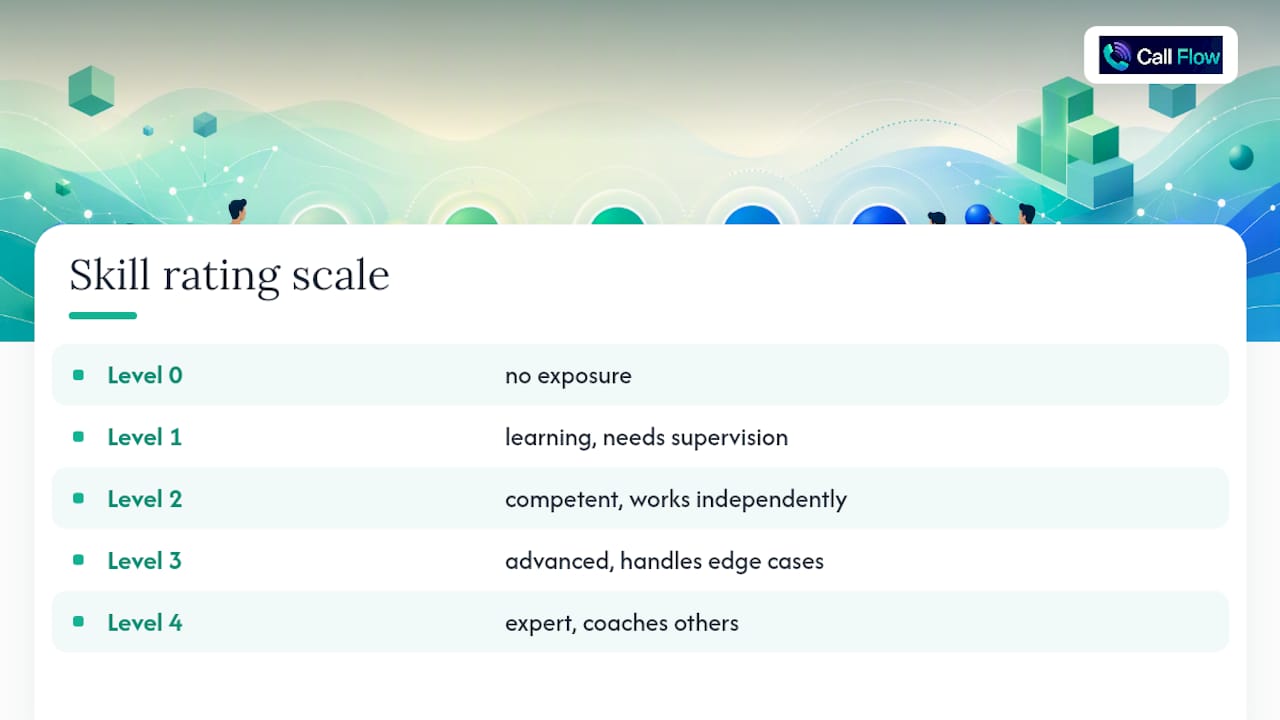
Most teams use a 0–4 scale: 0 (no exposure), 1 (learning, needs supervision), 2 (competent, works independently), 3 (advanced, handles edge cases), 4 (expert, coaches others). A 1–5 scale works too, but the anchors matter more than the numbers. Without a written definition of what a "3" looks like, one manager's 3 is another's 5, and the whole matrix loses meaning.
Don't confuse this with a competency matrix, which usually maps broader behavioral traits like leadership or communication, or a training matrix, which just tracks course completion. A skill matrix sits closer to day-to-day, job-specific ability, and a sales competency model can run alongside it for the softer traits.
Why Build a Skills Matrix? The Real Payoff
The matrix earns its keep the moment you need to staff a project or answer "what happens if this person quits." It shows you who covers what, and where you have exactly one person who can do something critical.
That "single point of failure" problem is more common than most managers assume. Gartner research found that only a small share of organizations have reliable workforce skills data, which means most teams are staffing decisions blind and calling it experience.
A working matrix supports:
- Project staffing decisions based on who actually has the skill, not who is available
- Bench strength checks that flag when only one person covers a critical skill
- Training and hiring priorities set by objective gaps instead of hunches
- Succession planning and compliance audits that need documented proof of coverage
What a Modern Skills Matrix Should Capture
A useful matrix captures both technical proficiency and relevant soft skills, rated consistently to provide a complete picture.
Add certifications with expiry dates, since a lapsed license is a real staffing risk, not a paperwork detail. Include an interest or willingness flag too. Someone rated a 3 in negotiation who has zero interest in doing more of it is a different planning problem than someone rated a 3 who wants to grow into it.
Finally, a decision-ready matrix should be updated continuously, not treated as a one-time snapshot, and every matrix needs a "required level" row showing the minimum score each role needs per skill. Without that row, you're staring at data with no baseline to compare it against.
How to Build a Team Skill Matrix in Under 90 Minutes
You don't need software or a committee to get a first version working. Here's the process:
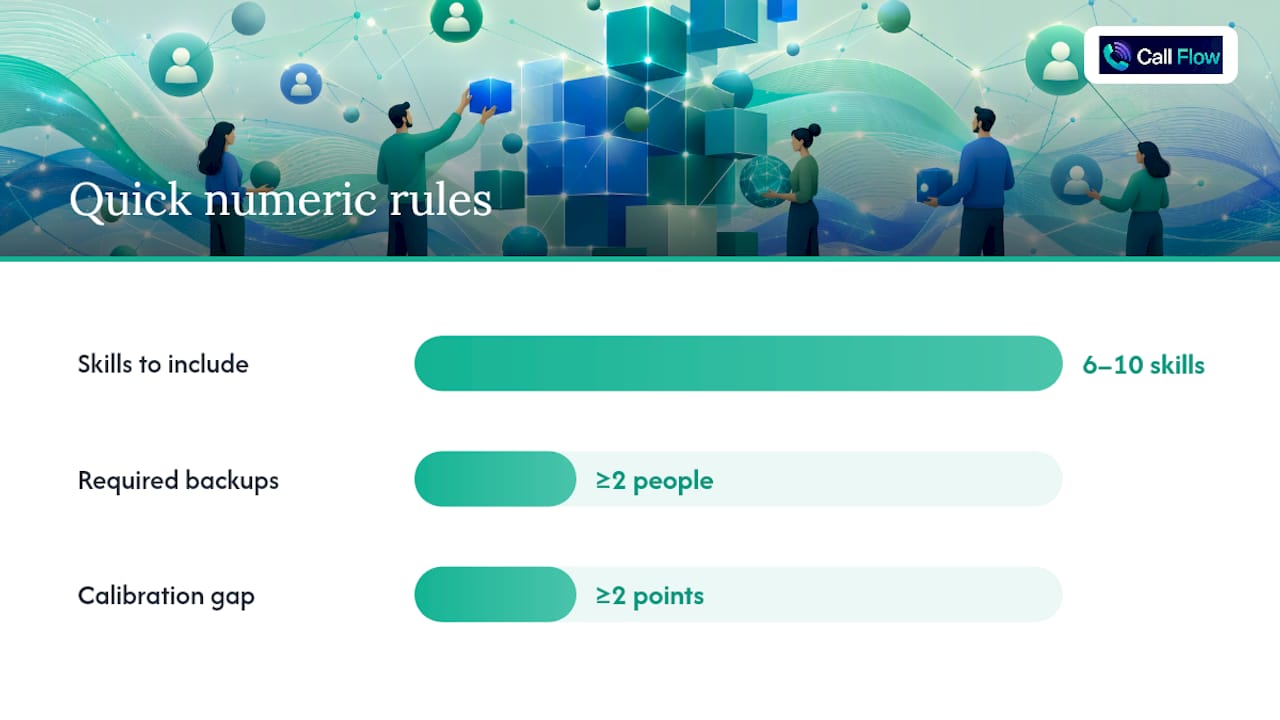
- Pick one team and 6 to 10 skills. Resist the urge to list 30. A matrix with too many skills becomes a chore nobody updates.
- Set the required level for each skill. Decide the minimum score the role needs and how many people on the team must hit it (one backup is rarely enough).
- Have managers rate first. Manager ratings anchor the baseline before self-perception skews the numbers.
- Collect self-ratings, then calibrate. Pull the team together only for the cells where manager and self-scores disagree by two points or more.
- Mark gaps and single points of failure. Any skill with zero people at the required level, or only one, goes straight onto an action list.
This mirrors the 30-minute build process many practitioner templates recommend: scope, list, set levels, rate, calibrate, act.
Once the raw ratings are in, a few spreadsheet formulas do most of the analysis for you. Use spreadsheet formulas like COUNTIF to tally how many meet or exceed required skill levels, indicating coverage. Use AVERAGE across each person's row to get a rough capability score for staffing conversations. Then apply conditional formatting so any cell below the required level turns red and any skill with coverage under 2 turns the whole column red. Templates built around this exact formula set exist for a reason: it works, and it takes minutes to set up.
Pro Tip: Skip full calibration meetings for every cell. Only pull people together to discuss the rows where manager and self-ratings disagree sharply, that's where the real conversation, and the real risk, usually is.
How to Validate Ratings So They're Trustworthy
A matrix built from self-ratings alone is a popularity contest, not data. Triangulating skill data across self-assessment, manager observation, and peer feedback reduces the bias baked into any single source, and it's the difference between a matrix people trust and one they quietly ignore.
For technical skills, short tests or real work samples beat opinion every time. For collaborative or judgment-based skills, scenario-based evaluations do the same job. Standardized scenario assessments like SAFE-TeamS have shown sensitivity to real skill improvement after training, which means a well-built scenario can tell the difference between someone who talks a good game and someone who actually performs under pressure.
Practical validation steps that work:
- Compare self-rating against manager rating and flag anything more than one level apart
- Run a 10-minute scenario or role-play for skills where the stakes are high, like objection handling or de-escalation
- Pull in HR or L&D for competencies tied to compliance or safety, where a bad rating has real consequences
- Use peer feedback sparingly, mainly for collaboration skills managers rarely observe directly
Callflow's own approach to sales skills assessment leans heavily on this kind of scenario testing, precisely because self-reported confidence and actual call performance are often two different things.
A Ready-to-Copy Template Structure
The simplest matrix layout is one tab per team, with names down the left column, skills across the top, and a required-level row pinned at the very top or bottom for easy reference. Keep it in Google Sheets or Excel to start; you don't need a platform to get value on day one.
A 30 to 90 minute checklist to get your first version live:
- Open a blank sheet and list your team's names in column A
- Add 6 to 10 skill headers across row 1
- Add a "required level" row directly under the headers
- Have managers fill in ratings, then collect self-ratings in a duplicate row per person
- Apply
COUNTIFper skill column and conditional formatting to flag anything under the required level
One team per sheet works fine until you're managing more than three or four teams, or leadership wants a rolled-up view across departments. At that point, a dedicated skills-matrix platform starts paying for itself in the visualization and reporting it saves you from rebuilding by hand.
Common Mistakes That Kill a Skills Matrix
The most common failure is listing too many skills. Twenty-five columns look thorough, but nobody keeps it updated past month two. Vague rating definitions cause the second most common failure. If "3" isn't written down somewhere, every manager invents their own version of it.
Relying on self-ratings alone is a close third. Calibrate against manager input every time, or the data drifts toward flattering nobody's actual capability.
On cadence, quarterly reviews work well for active teams, and that rhythm is the update frequency most guides recommend to keep the matrix relevant without becoming a full time job. Update immediately outside that cycle whenever someone changes roles or earns a new certification. Assign one owner, usually the team lead, and tie updates to existing workflows like project wrap ups or onboarding, so the matrix updates itself as a byproduct of normal work instead of a separate task everyone forgets.
Turning Gaps Into Hiring, Training, and Cross-Training Plans
A gap row is only useful once it becomes a decision. Convert it into a hiring brief with three fields: the specific skill, the required level, and how urgent the gap is based on how many people currently meet it.
For gaps you can close internally, build a targeted development plan or stretch assignment around the exact skill and level needed. A structured gap analysis pulled straight from CRM call data works well for sales teams specifically, since it ties the gap to real call outcomes instead of a self-reported number.
Cross-training closes single points of failure fastest. Pair your one expert with a backup and document the process along the way; preserving that knowledge matters as much as the training itself. Track progress with two numbers: coverage count per skill and average bench strength per team, both pulled straight from your COUNTIF and AVERAGE formulas.
Why Calibration Conversations Matter More Than the Spreadsheet
The spreadsheet is the easy part. What actually determines whether a matrix stays useful is whether managers have honest calibration conversations instead of rubber-stamping self-ratings, and whether anyone bothers to update it after the first exciting rollout week.
The best signal I've seen for rating quality isn't the manager's opinion alone. It's what happens when you put someone in a realistic scenario and watch what they actually do under pressure, which is exactly why scenario-based checks outperform surveys for anything involving judgment or communication. If you want to see that principle applied to sales conversations specifically, Callflow's blog has practical breakdowns of AI-driven scenario practice worth a look.
— Costa
Validate What the Matrix Finds With Real Practice Reps
A skill matrix tells you a rep is rated a 2 in objection handling. It doesn't tell you why, or fix it. This gap can be addressed with AI role-play scenarios that let agents practice the exact skill flagged by the matrix, then grade the attempt instantly across multiple performance dimensions instead of waiting for a manager to sit in on a call.
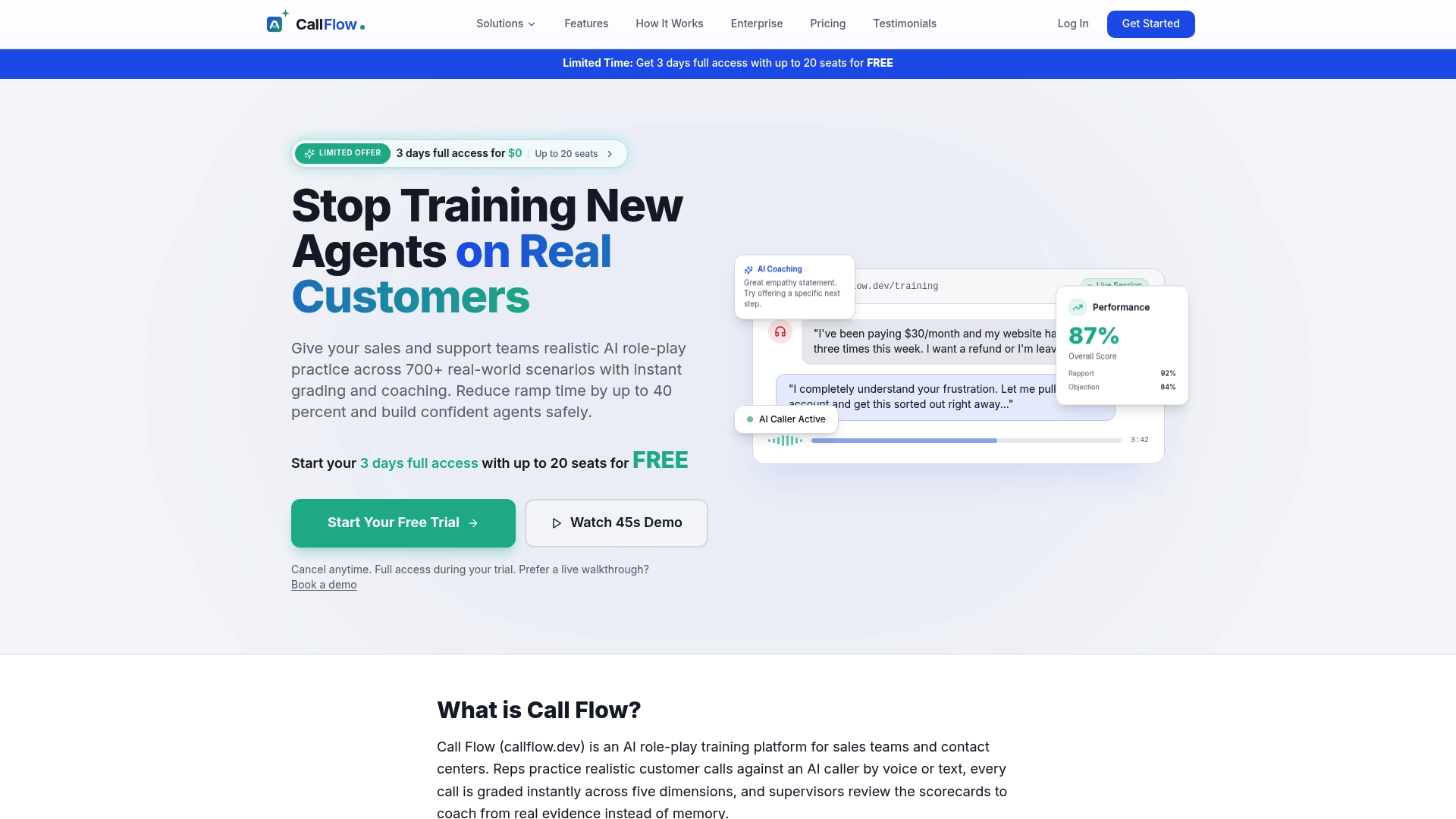
That instant grading and coaching feedback is what turns a matrix finding into measurable improvement. It also works as a validation layer for your matrix itself: a scenario-based score confirms whether that "2" rating holds up under real pressure. Explore how scenario-based practice maps to your team's skill gaps and start a trial to see your team's first scored scenario this week.
Sources
- Skills Matrix How-To Guide: Template, Examples & Tips
- Skills Matrix Template: Build One in 30 Minutes
- SAFE-TeamS study: Standardized Assessment for Evaluation of Team Skills
- Skills Matrix in 2026: The Complete Guide
- Gartner HR research press release
FAQ
What Format Should an Employee Skill Matrix Use?
A grid with people or roles in rows, skills as columns, and a proficiency score in each cell, plus a required-level row at the top so gaps stand out immediately.
What Are the Four Levels Commonly Used in a Skill Matrix?
A common four-point scale runs from 0 (no experience) to 1 (learning, needs supervision), 2 (competent, works independently), and 3 or 4 (expert, capable of coaching others), with exact wording varying by organization.
What Skills Should a Sales Skills Matrix Cover?
A strong sales skills matrix usually mixes technical skills like CRM proficiency and product knowledge with behavioral ones like objection handling, discovery questioning, and negotiation, validated through call review or scenario-based practice rather than self-reporting alone.
How Many Proficiency Levels Should a Competency Scale Have?
Most guides recommend either a 0–4 or 1–5 scale, with each level tied to a written behavioral anchor so ratings stay consistent across different managers.
How Often Should a Team Skill Matrix Be Updated?
Quarterly reviews work well for active teams, with immediate updates whenever someone changes roles, earns a certification, or completes major training.