

A call center training manual works best as a two-layer system: a 1–2 page training map that orients new agents, plus short task pages each covering one procedure in under two minutes. This structure, recommended by SOPX's training manual guide, is faster to build and far easier to keep current than a single long document.
Copy this checklist into your manual's table of contents now:
- Welcome and role summary — what the job is and how to use the manual
- 30/60/90-day ramp timeline — milestones, owners, and acceptance criteria
- Tools and system access — logins, CRM setup, and communication platforms
- Call scripts and call flows — opening, verification, info-gathering, and close
- Standard operating procedures (SOPs) — step-by-step task pages for every core procedure
- Escalation framework — severity levels, who to notify, and required ticket contents
- QA standards and KPIs — scorecard dimensions, target bands, and coaching cadence
- Training modules and assessments — LMS courses, role-play scenarios, and knowledge checks
- Governance and updates — section owners, review schedule, and change log
Immediate next step: Download or copy the sample table of contents in Section 9, assign one owner per section, and run a one-week microtest with three new hires before rolling out to the full team.
Key Takeaways
A complete call center training manual requires a two-layer structure, section-by-section ownership, and a live practice component to produce measurable improvements in ramp time, FCR, and QA scores.
| Point | Details |
|---|---|
| Two-layer structure | Build a 1–2 page training map plus short task pages; each task page should be readable in under two minutes. |
| 30/60/90 milestones | Define acceptance criteria for each phase before day one so agents and supervisors share the same definition of "ready." |
| QA scorecard alignment | Weight dimensions (accuracy 30%, tone 25%, compliance 20%, resolution 25%) and set the passing score before the first review cycle. |
| Governance prevents drift | Assign one named owner per section, log every change, and review SOPs and scripts quarterly. |
| Callflow accelerates practice | AI role-play with instant grading maps to your QA scorecard and supports 147% faster ramp time when paired with a structured manual. |
Table of Contents
- Why a training manual matters for contact center performance
- What to include in a call center training manual: section-by-section checklist
- How to write call scripts and call flows that agents actually use
- Standard operating procedures and escalation framework
- Training delivery methods: LMS, microlearning, simulations, and role-play
- Onboarding timeline: 30/60/90-day plan with readiness checkpoints
- How to measure training effectiveness and run continuous coaching
- Ready-to-adapt training manual template and sample table of contents
- How to write, format, and maintain the manual
- How AI role-play fits your training manual and accelerates ramp time
- A training lead's perspective on what actually works
- Callflow makes your manual's practice layer work faster
- Sources
Why a training manual matters for contact center performance
Structured onboarding reduces time-to-productivity and cuts the volume of interruptions experienced staff field from new hires. SHRM's HR guidance frames this as a cost-saving investment, not an administrative task. For contact centers, where every week of extended ramp time translates directly to lower first-call resolution and higher supervisor load, that framing matters when you need leadership buy-in.
The business case for a well-built manual comes down to four measurable outcomes:
- Faster ramp time. Agents who have a clear training map and task pages reach independent performance sooner because they spend less time searching for answers.
- Fewer repeat escalations. When escalation criteria are written down and practiced, agents escalate correctly the first time instead of guessing.
- Consistent tone and compliance. A shared script library and QA scorecard mean every agent handles the same situation the same way, which protects brand and regulatory standing.
- Lower turnover. Agents who feel prepared in the first 30 days are less likely to leave. Unpreparedness is one of the most cited early-tenure frustrations in contact center roles.
To estimate ROI, track three metrics during your pilot: average days to independent performance (ramp time), first-call resolution rate in weeks 1–4, and escalation volume per agent in the first 30 days. Compare those numbers before and after the manual is in use. Even a modest reduction in ramp time across a cohort of ten agents produces measurable cost savings when you multiply by average hourly cost and supervisor time recovered.
What to include in a call center training manual: section-by-section checklist
A template-driven approach lets teams produce consistent manuals quickly. The sections below are the minimum viable structure. Each entry includes what must exist inside it.
Welcome and role summary
State the job's purpose in two sentences, explain how to navigate the manual, and tie it to the broader training program. MadCap Software's guidance on employee training manuals specifically calls out a "how to use this manual" section as a driver of adoption. Without it, agents skip to scripts and miss the context that makes scripts work.
30/60/90-day ramp timeline
Map each phase to objectives, activities, and a clear definition of "done." The timeline belongs in the manual, not just in a manager's head. See Section 7 for a full table.
Tools and system access
List every platform the agent will use (CRM, telephony, ticketing, knowledge base), with login instructions and a first-day checklist. Include a screenshot or short screen-capture link for each tool. Agents who can't log in on day one lose hours of productive training time.
People to know
Name the team lead, QA analyst, IT contact, and escalation supervisor. Include Slack handles or extension numbers. This section reduces the "who do I ask?" interruptions that slow experienced staff.
Product and service knowledge
Cover the core product catalog, common use cases, and known issues. Keep this section modular so it can be updated without touching the rest of the manual. Link to the knowledge base for deep reference; the manual teaches how to use that knowledge, not how to memorize it.
Call handling, scripts, and call flows
Include the standard opening, verification sequence, info-gathering prompts, and close. Add decision-node diagrams for the three or four most common call types. Full guidance is in Section 4.
SOPs and escalation framework
One task page per procedure, each following the same template: purpose, when to use it, tools needed, step-by-step actions with checks, expected outcome, and common mistakes. HiveDesk's call center SOP template recommends including call-handling procedures, escalation paths, QA standards, training requirements, reporting metrics, compliance notes, and a review schedule as the core SOP sections.
QA standards and metrics
Define the QA scorecard dimensions, target scores, and what triggers a coaching conversation. Agents should read this section before their first monitored call, not after their first failed QA review.
Troubleshooting guide
Document the ten most common issues agents encounter, with a resolution path for each. Pull this list from your existing ticket data. Update it quarterly.
Policies and compliance
Separate this from the how-to content. As Helply's customer service training manual guide notes, manuals teach how to do the job; policies set standards. Keep compliance rules in a dedicated section with a clear "last reviewed" date and a link to the full policy document.
Learning resources and appendix
Link to LMS courses, role-play modules, and any external certifications. Include a glossary of internal terms, acronyms, and product names. New agents in contact centers encounter a dense vocabulary in the first week; a one-page glossary cuts confusion fast.
Sample table of contents you can paste directly:
| Section | Minimum content |
|---|---|
| Welcome and role summary | Job purpose, manual navigation guide, link to training program |
| 30/60/90 ramp timeline | Milestones, owners, acceptance criteria per phase |
| Tools and system access | Platform list, login steps, first-day checklist |
| People to know | Names, roles, contact details |
| Product and service knowledge | Core catalog, common use cases, KB link |
| Call scripts and call flows | Opening, verification, info-gathering, close, decision diagrams |
| SOPs and escalation | Task pages per procedure, escalation matrix |
| QA standards and metrics | Scorecard, target bands, coaching triggers |
| Troubleshooting guide | Top 10 issues with resolution paths |
| Policies and compliance | Compliance rules, last-reviewed date, full policy link |
| Learning resources and appendix | LMS links, role-play modules, glossary |
How to write call scripts and call flows that agents actually use
The core scripting principle: lead with the answer, then explain. Every script opens with a clear statement of who the agent is and what they can do, not a long preamble. Agents who internalize this principle handle off-script moments better because the structure is logical, not memorized.
Three sample scripts to adapt
1. Inbound support opening
Keep the opening under 12 words after the greeting. Avoid "Your call is very important to us" — it signals a script, not a person. Move directly to the customer's issue.
2. Verification and info-gathering
Phrases to avoid: "Bear with me," "I'm going to go ahead and," "No problem" as a response to a complaint. Each one either stalls the call or minimizes the customer's concern.
3. Escalation handoff
This script does three things: it explains the reason for the transfer, sets an expectation, and asks for consent. All three reduce customer frustration at the handoff point.
Call flow design
A call flow is a decision tree, not a script. Draw it with four node types: start, decision (yes/no branch), action (what the agent does), and end. For a standard inbound call, the flow looks like this:
- Greeting and opening
- Verify account (decision: verified? yes → continue; no → re-verify or escalate)
- Identify issue type (decision: in scope? yes → handle; no → escalate)
- Resolve or escalate
- Confirm resolution and close
Keep each flow to one page. If it runs longer, split it into two flows connected by a handoff node.
Pro Tip: Use short scripts (word-for-word) for openings, closings, and compliance-required statements. Use behavior-based prompts ("acknowledge the frustration, then restate the issue") for everything in between. Test every script in a role-play session before publishing it in the manual. Agents will find the awkward phrases faster than any editor will.
Standard operating procedures and escalation framework
A reusable SOP template keeps every task page consistent and cuts the time it takes to write new ones. Use this structure for every procedure in the manual.
SOP task page template
- Purpose — one sentence stating what this procedure accomplishes
- Scope — which agents use it and under what conditions
- Prerequisites — system access, permissions, or prior steps required
- Step-by-step actions — numbered steps, one action per step, with a check after any step where an error is likely
- Expected outcome — what "done" looks like
- Common mistakes — two or three errors agents make and how to avoid them
Escalation framework
Define four severity levels and document each one:
- Level 1 (self-resolve): Agent handles without assistance. Resolution target: within the current call.
- Level 2 (warm transfer): Agent transfers to a specialist with a verbal handoff summary. Resolution target: same session.
- Level 3 (supervisor): Supervisor joins or takes the call. Required ticket contents: issue summary, steps already taken, customer sentiment.
- Level 4 (critical/complaint): Formal complaint or legal risk. Notify team lead and QA within 15 minutes. Document verbatim customer statements.
Escalation checklist for new-hire training
Use this list to verify an agent is ready to handle escalations independently:
- Can state the four severity levels without prompting
- Knows the name and contact method for each escalation target
- Can complete a warm transfer with a verbal handoff summary in under 60 seconds
- Has practiced a Level 3 escalation in at least one role-play session
- Knows which ticket fields are required before escalating
Training delivery methods: LMS, microlearning, simulations, and role-play
The manual is the reference document. Delivery is how agents actually learn the content. Match the format to the learning objective.
- Instructor-led training (ILT): Best for complex procedures, compliance content, and anything requiring discussion. Use in weeks 1–2 of onboarding. Limit sessions to 90 minutes; attention drops sharply after that.
- LMS courses: Best for product knowledge, policy review, and assessments with a completion record. Use asynchronous LMS modules for content agents need to revisit independently. Structured curricula for call center roles show modular learning with competency mappings and formal assessments as the standard approach.
- Microlearning: Best for reinforcement after initial training. Short videos or single-topic pages (under five minutes) that agents access on demand. Scribe's documentation guidance notes that short task pages and visual guides speed both documentation and ongoing updates, making microlearning a natural fit for keeping content current.
- Simulations and role-play: Best for call handling, escalation practice, and soft skills. Simulations let agents make mistakes without affecting real customers. Role-play with a supervisor or peer gives immediate behavioral feedback.
Module structure for the manual
Each training module in the manual should follow this pattern:
- Learning objective — one measurable behavior the agent will demonstrate
- Prework — reading or video to complete before the session
- Procedure or task pages — the relevant manual sections
- Practice activity — role-play scenario, simulation, or knowledge check
- Assessment — pass/fail criteria and the score required to advance
- Feedback loop — how results are recorded and shared with the supervisor
Document assessment outcomes in the manual's governance section so QA calibration sessions can reference them. An agent's assessment history is useful context when coaching on recurring errors.
Onboarding timeline: 30/60/90-day plan with readiness checkpoints
The 30/60/90 structure gives new agents clear milestones and gives supervisors objective criteria for advancement. Reducing ramp time depends on having those criteria defined before day one, not discovered during a performance review.
| Phase | Weeks | Objectives | Key activities | Success criteria |
|---|---|---|---|---|
| Day 1–30 | 1–4 | System access, product basics, first monitored calls | ILT, tool setup, shadowing, 3 role-play sessions | Pass product knowledge check (80%+); complete 10 supervised calls |
| Day 30–60 | 5–8 | Independent call handling, SOP fluency, first QA review | Solo calls with QA monitoring, SOP practice, weekly 1:1 coaching | QA score ≥ team baseline; FCR ≥ 70% on solo calls |
| Day 60–90 | 9–12 | Full independence, escalation handling, performance targets | Unsupported call queue, escalation role-play, KPI review | AHT within 10% of team average; CSAT ≥ team target; zero unresolved escalation errors |
Day-30 readiness checklist
- All system logins confirmed and working
- Product knowledge assessment passed
- Ten supervised calls completed with documented feedback
- Escalation levels and contacts memorized
- First QA scorecard reviewed with supervisor
Day-60 readiness checklist
- QA score at or above team baseline for two consecutive weeks
- FCR at or above 70% on independently handled calls
- One escalation handled correctly under observation
Day-90 readiness checklist
- AHT within 10% of team average
- CSAT at or above team target for the prior two-week period
- No unresolved escalation errors in the last 30 days
- Manual feedback submitted (at least one suggested update)
How to measure training effectiveness and run continuous coaching
A QA scorecard makes coaching objective. Without one, feedback is opinion. With one, it is data.
Sample QA scorecard dimensions
| Dimension | Weight | What to evaluate |
|---|---|---|
| Accuracy | 30% | Correct information given; no policy errors |
| Tone and empathy | 25% | Professional, calm, and customer-focused throughout |
| Compliance | 20% | Required disclosures stated; no prohibited phrases used |
| Resolution completeness | 25% | Issue fully resolved or correctly escalated; next steps confirmed |
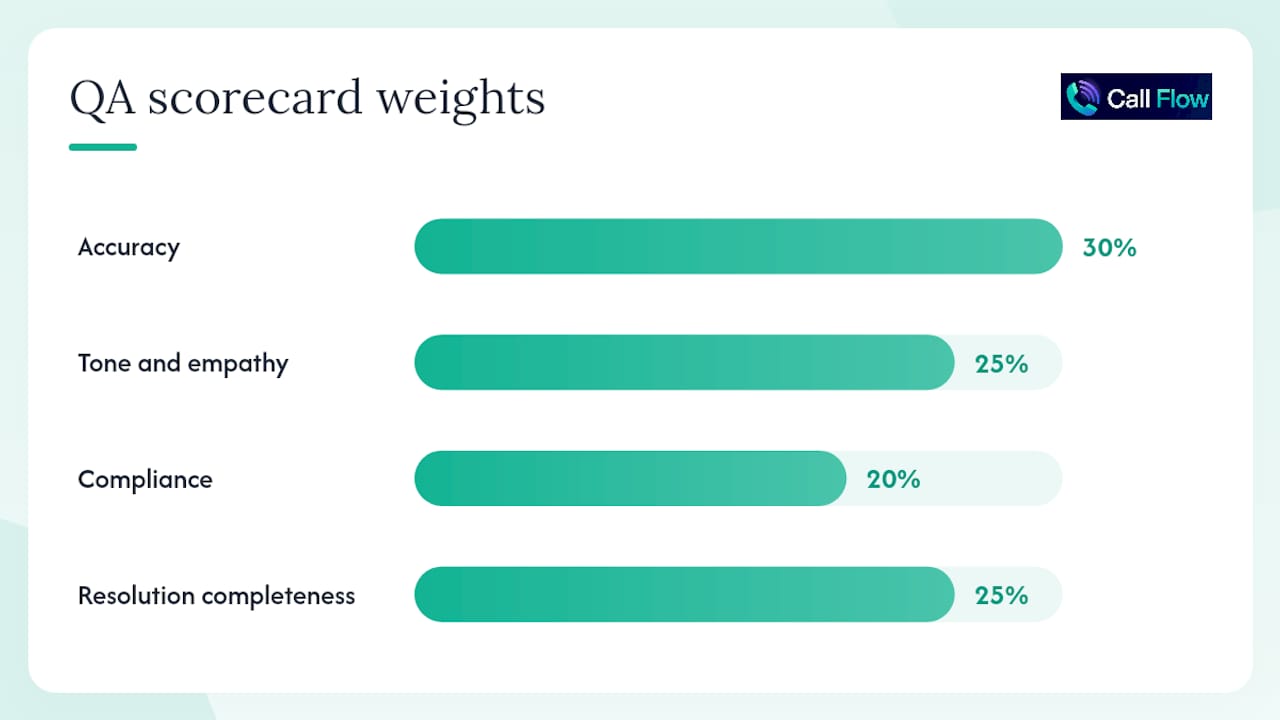
Score each dimension on a 1–5 scale. A total score below 3.0 triggers an immediate coaching conversation. Scores between 3.0 and 3.9 go into the weekly 1:1 agenda.
Essential KPIs and target bands
- Average Handle Time (AHT): Baseline varies by industry; set your target as the team median in month one, then tighten by 5–10% each quarter.
- First-Call Resolution (FCR): A common baseline target is 70–75% for new agents in their first 60 days.
- CSAT: Track weekly. A two-point drop over two consecutive weeks is a coaching signal, not a data anomaly.
- QA score: Set the minimum passing score before training begins, not after the first review cycle.
- Ramp time: Measure days from start date to first day of independent performance. Track this per cohort to see whether the manual is improving over time.
Coaching cadence
- Daily huddle (10 minutes): Share one QA finding from the prior day. Rotate which agent's call is reviewed so the process feels normal, not punitive.
- Weekly 1:1 (30 minutes): Review KPI trends, address one specific behavior from QA, and set one goal for the following week.
- Monthly QA calibration (60 minutes): Supervisors and QA analysts score the same call independently, then compare. Disagreements reveal scoring drift and prompt manual updates.
Link coaching notes to the manual directly: when a coaching conversation identifies a recurring error, that error goes into the relevant SOP's "common mistakes" field within 48 hours.
Ready-to-adapt training manual template and sample table of contents
A template-first approach lets teams produce consistent manuals and spend less time answering repetitive questions. The sample TOC below is ready to copy. Add an owner field, a "last updated" date, a doc version number, and a link to the related SOP for each section.
Distribution options
- Google Docs or Microsoft Word: Fast to set up, easy to share, and version history is built in. Best for teams under 50 agents.
- Wiki or internal knowledge base (Confluence, Notion): Better for larger teams. Each section becomes a page; task pages link directly from the TOC. Search makes content findable without navigating the full document.
- LMS (TalentLMS, Docebo, Cornerstone): Best when the manual doubles as a formal training record. Embed task pages as modules and attach assessments directly.
To embed a short task page, paste the SOP template from Section 5 into a new page, add one screenshot per step, and link it from the relevant TOC row. Keep each task page under 400 words.
How to write, format, and maintain the manual
Style checklist
- One action per numbered step. Never combine two actions in one step.
- Short sentences. If a step needs a subordinate clause to explain why, put the "why" in a note below the step, not inside it.
- Consistent heading levels. H1 for section titles, H2 for subsections, H3 for task page titles.
- Screenshots for every UI step. Label each screenshot with an arrow or callout; don't rely on the reader to find the button you mean.
- Alt text for every image. Screen readers used by agents with visual impairments need descriptive alt text on every screenshot and diagram.
- Plain language. Write at a reading level accessible to a new hire on their first day, not a tenured specialist.
Version control and ownership
Assign one named owner to each section. That person is responsible for accuracy, not just for writing. Set a review cadence: quarterly for scripts and SOPs, semi-annually for product knowledge, annually for policies (or immediately after a policy change).
Log every change in a simple table at the front of the document:
| Date | Section | Change summary | Owner |
|---|---|---|---|
| [date] | Escalation framework | Added Level 4 criteria for legal complaints | QA lead |
| [date] | Call scripts | Updated verification script per compliance review | Training lead |
Change-reporting workflow
Front-line agents find errors faster than any review cycle will. Give them a direct path to report them:
- Agent flags an error using a shared form or a comment in the doc.
- Section owner reviews the flag within 48 hours.
- Owner either corrects the content or documents why the current version is correct.
- Change log is updated.
- Agent who flagged the error receives a brief acknowledgment.
This loop keeps the manual accurate and signals to agents that their input matters, which increases the likelihood they will use the manual rather than ignore it.
How AI role-play fits your training manual and accelerates ramp time
AI role-play belongs in the manual's practice modules, assessment milestones, and ramp timeline, not as an add-on after training ends. The core benefit is immediate: agents get graded feedback on every simulated call without waiting for a supervisor to review a recording.
Where to reference AI role-play in the manual
- Practice modules: List specific role-play scenarios alongside each SOP and script section. Agents complete the scenario before the assessment, not after.
- Ramp milestones: Add a role-play completion requirement to each 30/60/90 checkpoint. For example, "Complete three inbound support scenarios with a score of 80% or above before advancing to solo calls."
- QA scorecard alignment: Map the role-play grading dimensions to your QA scorecard. If your scorecard weights tone at 25%, the role-play rubric should score tone on the same scale.
Implementation steps
- Design scenarios from real call data. Pull the top five call types from your ticket system and build one scenario per type. Use actual customer language, not idealized versions.
- Integrate with your LMS. Assign scenarios as required completions before live-call access. Track completion and scores in the same dashboard as other assessments.
- Align the grading rubric to the QA scorecard. Agents should see the same dimensions in practice that they will be scored on in production.
- Use supervisor dashboards to identify patterns. If multiple agents score low on compliance in simulations, that is a manual gap, not an individual performance issue. Update the relevant SOP.
- Link role-play results to coaching notes. When a supervisor reviews a low simulation score, the coaching note goes into the same record as QA call reviews.
Callflow's AI mock call practice platform supports all five steps: configurable scenarios, instant grading across five performance dimensions, and a supervisor dashboard that surfaces skill gaps across the team. Teams using structured simulation alongside a written manual have onboarded BPO agents in 9 days instead of the typical 24, and some cohorts reached first dial in 98 minutes using a simulated rapid-desensitization approach.
Pro Tip: Run one AI role-play scenario on day one, before any live call. Agents who practice a simulated call first are less hesitant on their actual first call. The scenario doesn't need to be perfect; it just needs to be realistic enough to trigger the same nerves. That early exposure is what makes the rest of the ramp faster.
A training lead's perspective on what actually works
The most common mistake when building a call center training manual is writing it for the person who already knows the job. Every step that seems "obvious" to a tenured agent is a gap for a new hire. Document the obvious things first.
Here are five practical tips from the build process:
- Start with the three calls that break new agents. Pull your escalation data and find the scenarios that cause the most incorrect escalations or repeat contacts. Write those SOPs before anything else.
- Test every task page by watching someone do it. Sit with a new hire and watch them follow the steps without coaching. Where they pause or ask a question, the page is incomplete.
- Schedule shadowing before solo calls, not alongside them. Agents who shadow for two full days before taking their first solo call make fewer errors in week two than agents who shadow and solo simultaneously.
- Write scripts with agents, not for them. Run a 30-minute session with two or three experienced agents and record the natural language they use. That language is your script draft.
- Assign a "manual owner" who is not the training manager. The training manager is too close to the content. A QA analyst or senior agent who uses the manual daily will catch gaps the training manager misses.
The six pitfalls that derail most manual projects:
- Overly long manuals. Agents stop reading after page 20. Keep the training map under two pages and each task page under 400 words.
- No assigned owners. Sections without owners go stale within 90 days.
- Vague escalation criteria. "Escalate when needed" is not a criterion. Define severity levels with specific triggers.
- No practice built in. A manual without a role-play or simulation requirement is a document, not a training program.
- Assessment misalignment. If the assessment tests knowledge the manual doesn't cover, agents fail for the wrong reasons.
- No feedback loop. Agents who find errors and have no way to report them stop trusting the manual.
Run a two-week pilot with a cohort of five agents before wide rollout. Track ramp time, QA scores, and escalation accuracy during the pilot. Those three numbers tell you whether the manual is working before you invest in scaling it.
Callflow makes your manual's practice layer work faster
A well-written manual gives agents the knowledge. Practice is what converts that knowledge into confident call handling. Callflow's call center AI training platform provides the practice layer: realistic voice and text simulations, instant grading across five dimensions (accuracy, tone, compliance, resolution completeness, and communication), and a supervisor dashboard that shows skill gaps across the entire team.
For training managers, the concrete advantage is objective coaching data from day one. Instead of waiting for a QA analyst to review a recorded call, supervisors see simulation scores immediately after each practice session. That data maps directly to the QA scorecard in your manual, so coaching conversations are grounded in the same criteria agents were trained on. Callflow reports 147% faster ramp time and a 129% improvement in resolution rates for teams using structured simulation alongside a written manual.
Start with a free mock call practice session to test one scenario from your manual before committing to a full rollout.
Sources
These resources back the recommendations in this guide and give you ready-to-use starting points: